Building a voice AI agent on Rime Prism with jambonz Agent Studio
Rime has built its name on text-to-speech voices that sound genuinely human. With Prism, they’ve brought that to speech-to-speech: one model that listens, decides when you’ve finished, and replies in its own voice. It’s fast, and honestly, I think it’s the best speech-to-speech model out there right now.
Prism is available today in Agent Studio, on jambonz.cloud and self-hosted jambonz. To show what it can do, I rebuilt the Harbor Dental receptionist from the launch video on Prism: same business details, same FAQ, different engine.
What the video shows
Building it takes a couple of minutes. In Agent Studio, a speech-to-speech model is one of four engines an agent can run on. Choose Realtime voice API, pick Rime Prism, and start from the same Front desk template as any other agent. There’s no model to choose, just a voice: Prism has four, built for conversation.
The vendor handles the hard parts. Speech recognition, turn detection, barge-in and noise handling all happen inside Prism. It hears the caller’s voice directly, not a transcript, and decides for itself when they’ve finished. jambonz carries the call, adds the transfer and hangup tools, and records every turn.
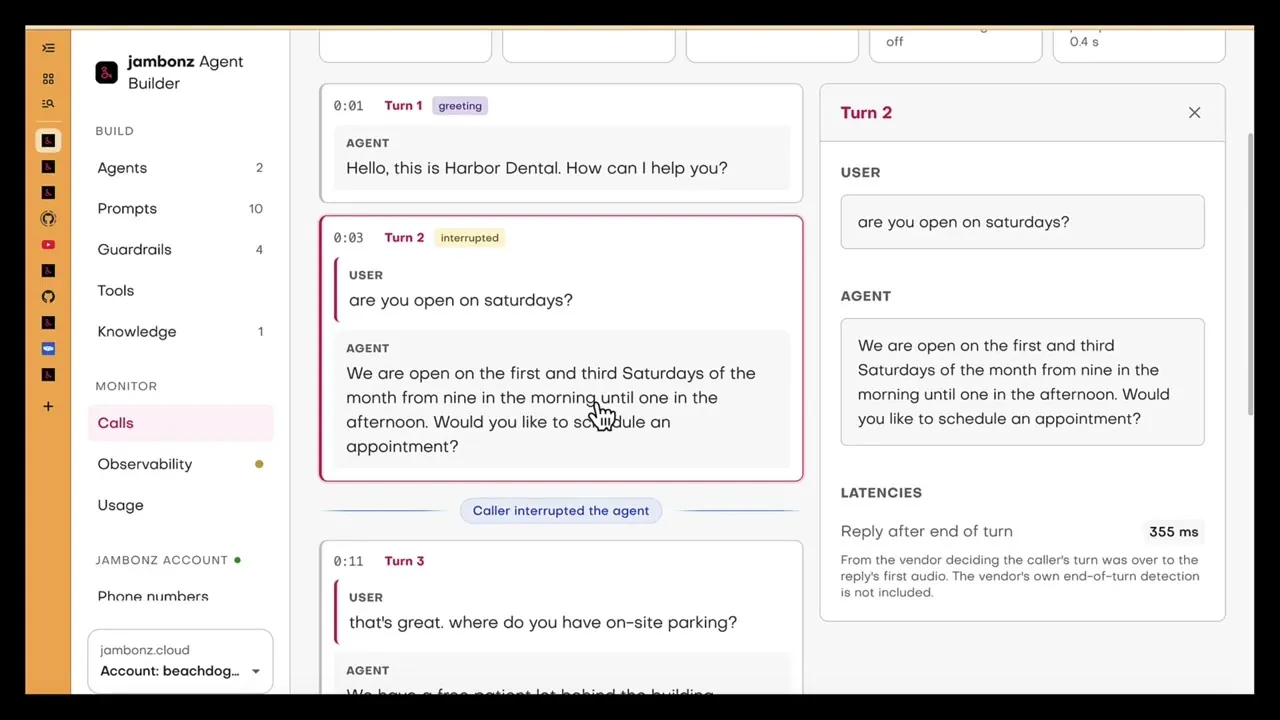
It’s fast, and Studio shows you exactly how fast. Studio records the latency of every turn. On the call in the video, Prism started replying 355 ms and 275 ms after deciding I’d finished speaking. Rime measures Prism at about 0.57 seconds end to end, end-of-turn detection included. Either way, there’s no awkward pause: it feels like talking to someone who’s listening.
Knowledge-base search works the same way. When a question needed the practice’s FAQ, Prism searched it. The trace shows the search as a tool call, with its round trip: 697 ms on that turn.
Interruptions sound clean. This is the detail I like most. When an agent’s audio is cut off mid-word, you can often hear a faint click. Prism sends jambonz a hint a fraction of a second before an interruption is confirmed, so we can turn the agent’s voice down early and fade it out, the way a person trails off when someone cuts in. Listen for it in the video: there’s no click, and no artifact, when the agent stops speaking.
Same agent, any engine. The Prism agent shares everything with the pipeline agent from the launch video: the prompt, the knowledge base, the phone numbers and the call history. Pipeline, speech-to-speech, a hosted agent or your own code: it’s one framework, and you can switch.
Try it yourself
- In the jambonz portal, add your Rime API key under LLM Services → Speech-to-speech → Rime Prism. Prism uses the same keys as Rime text-to-speech.
- In Agent Studio, create an agent, choose Realtime voice API, then Rime Prism.
- Under Model & voice, pick a voice: astra, aurora, brando or wawona.
- Call it from the browser, then assign it a phone number.
Prism’s turn-taking can be tuned in the agent’s options: how eager it is to take its turn, how long it waits at the end of a turn, and whether the caller can interrupt. The Agent Studio docs list every option.
On self-hosted jambonz, Prism needs jambonz 11.1.11 or later. jambonz.cloud already runs it, and you can start a free trial there.
Thanks to the team at Rime for building Prism, and for working with us on this.
Frequently asked questions
What is Rime Prism?
Prism is Rime's speech-to-speech model. It takes the caller's audio, decides when they have finished speaking, and replies in its own voice, all over one WebSocket connection. There is no separate speech-to-text, language model or text-to-speech for you to choose or stitch together.
How do I use Rime Prism in Agent Studio?
Add your Rime API key to your jambonz account under LLM Services, Speech-to-speech, Rime Prism (Prism uses the same keys as Rime text-to-speech). Then in Agent Studio create a new agent, choose Realtime voice API as the engine and Rime Prism as the vendor, and pick one of Prism's four voices.
Which voices does Prism support?
Four voices built for conversation: astra (the default), aurora, brando and wawona. Rime's text-to-speech voices are not available in Prism, and Prism is English only for now.
How fast is Rime Prism?
Rime puts Prism at about 0.57 seconds from the end of the caller's turn to the start of its reply, measured on Artificial Analysis's speech-to-speech benchmark. Agent Studio records its own figure for every turn, Reply after end of turn, which measures from the moment Prism decides the caller has finished to the reply's first audio. On the call in the video that was 355 ms and 275 ms on the turns shown.
What is Prism's speech hint, and what does jambonz do with it?
Prism can send a hint a fraction of a second before it confirms that the caller has started speaking. jambonz lowers the agent's voice as soon as the hint arrives, and fades it out when the interruption is confirmed rather than cutting the audio dead, so an interruption sounds like a person trailing off instead of a click. If the hint turns out to be a false alarm, the volume comes back up.
Can a Prism agent use tools and a knowledge base?
Yes. Prism decides when to call a tool and waits for the result. In Agent Studio a knowledge base reaches the agent as a search tool, so a Prism agent answers from your documents the same way a pipeline agent does, and the call trace shows each search and how long it took.
What do I need to run Prism on self-hosted jambonz?
jambonz 11.1.11 or later. jambonz.cloud already runs it.